

Unreal Engine MCP Devin IDE: When the Connection Is Real and the Agent Builds Assets
I wired Devin IDE to Unreal Engine 5.8 with Epic's MCP plugin and the Python extension. Green status. Tool discovery. Then I stopped celebrating and gave it a real job.
Create a standard PBR shader material. Wire the map inputs. Build a material instance with exposed parameters.
It worked. Full shader network. Instance with controls. Not a hallucinated tutorial - actual assets sitting in my Content Browser while the Material Editor showed live nodes. That is what this Unreal Engine MCP Devin IDE test was for: proof that an agent can build real editor assets, not just describe them.
>Setup is theater until the agent creates something you can double-click. A PBR master with a material instance is the smallest honest proof that MCP hands are real.
UE 5.8First Test PassedDevin IDEExperimental
Why This Unreal Engine MCP Devin IDE Test Matters
I already wrote the wiring guide - plugins, All Toolsets,
ModelContextProtocol.GenerateClientConfig, startup order, kill-switch rules. That post gets you to a live loopback connection.This post is what happens after. The moment you trust the agent with editor work instead of proof prompts.
A PBR master material is the perfect first job because the result is inspectable. Either the node graph exists or it does not. Either the material instance exposes Roughness and Metallic or the agent lied. No ambiguity.
Prerequisite //
If MCP is not connected yet, start with the Unreal Engine MCP Cursor setup guide - same Epic plugin,
same port, same All Toolsets requirement. Devin IDE uses the same
http://127.0.0.1:8000/mcp
endpoint.Why Unreal Engine MCP + Devin IDE?
Devin IDE is not Cursor. Same MCP protocol, different client. The point of this test was to prove the stack is IDE-agnostic once Epic's server is running.
The combination that worked for me:
1
Epic MCP Plugin
Official experimental server in UE 5.8. Exposes editor subsystems to MCP clients on loopback.
2
All Toolsets
Without this, material and asset tools never register. Server up, hands missing.
3
Python Extension
Enabled alongside MCP. Some material and automation paths lean on Python in the editor.
4
Devin IDE Client
Connected to the same Streamable HTTP endpoint. Tool discovery, serial calls, human in the loop.
Platform Features
What the first successful Unreal Engine MCP material job actually delivered - and what I verified by hand in the editor.
PBR Master Material
M_PBR_Master with Texture Sample nodes for Base Color, Roughness, Metallic, and Normal.
Map Input Switches
Static switch parameters to toggle texture maps vs constant values on each channel.
Material Instance
MI_PBR_Master with exposed Base Color tint, Roughness, Metallic, Normal strength controls.
Live Preview Sphere
Material Editor preview updated as nodes connected - outdoor HDRI lighting, opaque surface.
Substrate-Ready Output
Master material wired to standard lit outputs - Base Color, Metallic, Specular, Roughness, Normal.
Human-Verified Receipt
I opened both M_PBR_Master and MI_PBR_Master tabs - graph and instance panel matched the brief.
The Prompt I Sent
One bounded job. No scope creep. I wanted the smallest useful PBR stack, not a landscape material system.
First Material Job Prompt
Create a standard PBR shader material with texture map inputs for Base Color, Roughness, Metallic,
and Normal. Add static switches to toggle maps vs constants. Create a material instance with exposed
parameters for Base Color tint, Roughness, Metallic, and Normal strength. Sandbox project only - one
tool call at a time.
The agent ran tool discovery first, then walked material creation serially.
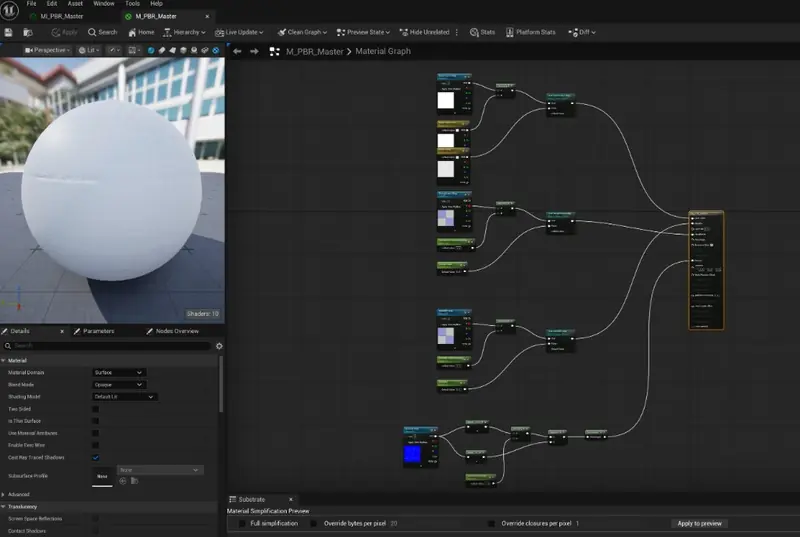
Unreal Engine MCP Devin IDE first test result: M_PBR_Master shader network with map inputs, static
switch parameters, and MI_PBR_Master instance open in the Material Editor - created by the agent,
verified by hand.
>Key Insight: The screenshot is the contract. Agents can describe PBR all day. A populated node graph in your project is the only receipt that matters.
What I Verified in the Editor
I did not trust the success message. I clicked every asset.
Master material (
M_PBR_Master):- Material Domain: Surface, Blend Mode: Opaque, Shading Model: Default Lit
- Texture Sample nodes grouped for Base Color, Roughness, Metallic, Normal
- Static Switch Parameters routing map vs constant paths
- Outputs wired to the main material node
Material instance (
MI_PBR_Master):- Parent: M_PBR_Master
- Parameter overrides visible in the Details panel
- Preview sphere responded when I tweaked Roughness and Metallic
Key Win //
First real MCP job, first pass. Not perfect art direction - but a production-shaped PBR template an
artist can iterate on instead of rebuilding from scratch.
Kill-Switch Rules I Kept Active
Even on a success run, the same safety rules from setup day applied:
text
Reality Check //
Experimental MCP plus Python in the editor is power with no auth on loopback. A successful first test
is not permission to let the agent roam. Keep the kill-switch written and enforced.
EPIC UE 5.8 MCP DOCS →
PBR MasterMaterial InstanceField Report