

Unreal Engine MCP Cursor: When the Server Is Up but the Agent Has No Hands
I enabled the Unreal Engine 5.8 MCP plugin, watched the Output Log cheerfully announce a server on port 8000, and opened Cursor expecting Spatial AI to drive my editor.
Nothing. Green checkmark fantasies. Empty tool lists. An agent that could talk about Unreal but could not see a single selected actor.
That is the failure chain Epic's docs bury - and fixing it is the whole point of this Unreal Engine MCP Cursor setup. Enable All Toolsets, turn on Auto Start, run
ModelContextProtocol.GenerateClientConfig Cursor, start Cursor after the editor, walk tool discovery, then prove the loop before any destructive tool fires.>The trap: Unreal MCP starts the server. All Toolsets loads the actual tools. Skip the second plugin and you get a live connection with nothing behind it - the agent looks smart and acts blind.
UE 5.8Official MCPExperimentalSpatial AI
Why Unreal Engine MCP Cursor Matters Now
Epic shipped an experimental MCP plugin with UE 5.8 - exposure to Blueprints, assets, levels, materials, meshes. Hiring managers already ask whether you can wire an agent into a real-time 3D stack.
Spatial AI is useless until something gives the agent hands. MCP is those hands. Viewport capture is the eyes. A written kill-switch is what keeps the project alive when the hands get confident.
1
All Toolsets, Not Just Unreal MCP
The Unreal MCP plugin starts the server. All Toolsets registers Blueprint, asset, and level toolsets.
One without the other is a dead connection.
2
Loopback Only, No Auth
Official bind is http://127.0.0.1:8000/mcp. No authentication. Never expose this off localhost -
that is not a feature gap, it is a safety boundary.
3
Tool Search, Not Full Schema Dump
Default bEnableToolSearch returns list_toolsets, describe_toolset, call_tool - not every schema.
Agents look dumb until they walk discovery.
4
Editor First, Cursor Second
Launch Cursor before the editor and the first connection attempt dies at startup. Order is not
optional - it is the difference between green status and a day of debugging.
Platform Features
Everything you need for a working Cursor Unreal MCP loop. Epic's plugin is experimental - APIs will change, tool calls serialize on the game thread, and HTTP+SSE is what the docs still list even as Streamable HTTP is the path forward.
Unreal MCP Plugin (ModelContextProtocol)
Official experimental server in UE 5.8. Enables MCP exposure to editor subsystems.
All Toolsets Registry
Loads toolsets Unreal MCP does not implement itself. Without this, tools/list is empty.
GenerateClientConfig Console
ModelContextProtocol.GenerateClientConfig Cursor writes .mcp.json at the UE project root.
Auto Start on 127.0.0.1:8000/mcp
Editor Preferences → General → Model Context Protocol. Streamable HTTP endpoint on /mcp.
Serial Game-Thread Tool Calls
Do not overlap MCP tool calls. The editor serializes on the game thread - parallel calls break.
Experimental, APIs Will Change
Pin your UE version and transport spec. Treat production maps as off-limits until proven safe.
Step 1: Enable Unreal MCP and All Toolsets
Open Edit → Plugins. Search Unreal MCP (identifier ModelContextProtocol) and enable it. Search All Toolsets and enable that too.
Restart the editor when prompted. I mean actually restart - not "I'll restart later." Toolsets load on boot.
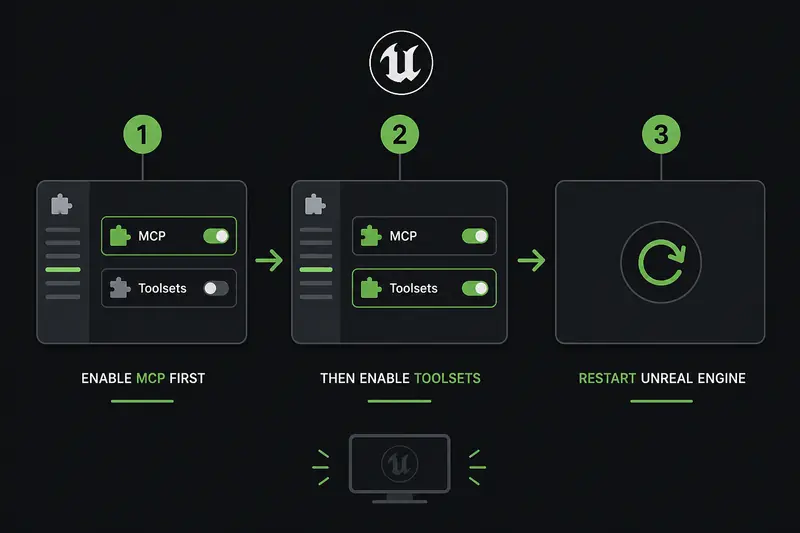
Unreal MCP All Toolsets enable order: both plugins on, then restart. Skipping All Toolsets is the
most common reason tools/list comes back empty on a live server.
Reality Check //
Toolsets are NOT implemented by Unreal MCP itself. The Toolset Registry plugin loads them. If you
only enable Unreal MCP, you will spend an hour thinking MCP is broken when the server is fine.
Step 2: Auto Start and the 127.0.0.1:8000/mcp Endpoint
Go to Edit → Editor Preferences → General → Model Context Protocol. Turn on Auto Start Server.
Confirm the bind stays on loopback:
http://127.0.0.1:8000/mcp. No auth exists on this server. Binding it to your LAN is how you hand the editor to anyone on the network.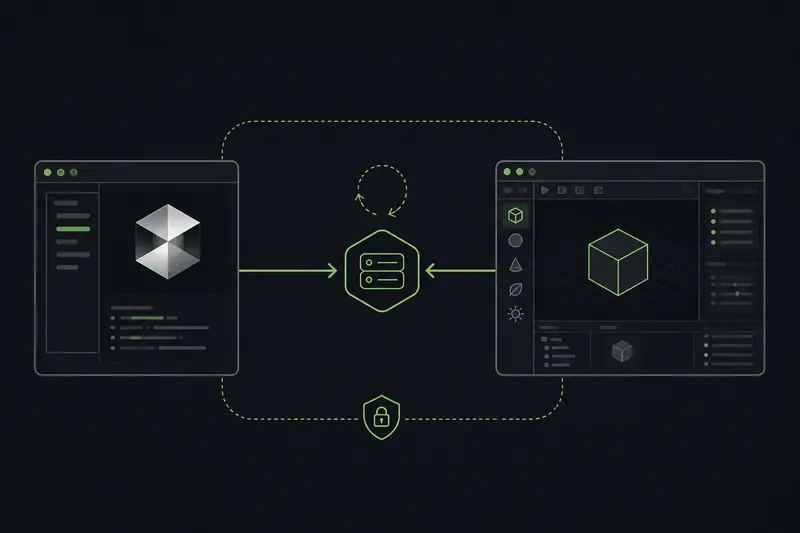
Cursor Unreal MCP traffic stays on 127.0.0.1:8000/mcp - Streamable HTTP on the official UE 5.8 path.
Loopback only is a feature of the experimental plugin, not a bug to work around.
>Key Insight: A running server with an empty tool registry feels like success. It is the worst failure mode - you stop looking for the real problem because the port is open.
Step 3: Generate Cursor Config from the Editor
Open the console and run:
text
Epic also supports ClaudeCode, VSCode, Gemini, Codex, and All. This writes or merges
.mcp.json at your UE project root with the official unreal-mcp block:json
Merge that into Cursor Settings → Features → MCP. If you already configured GitHub or Firebase MCP servers in Cursor, keep them - this is additive, not a replacement.
Pro Tip //
General Cursor MCP auth patterns (token vs CLI) are a different problem from Unreal. Learn that
foundation first if mcp.json is new to you - then add the unreal-mcp block on top.
Step 4: Startup Order and Tool Discovery
Start Unreal Editor first. Wait until Auto Start confirms the MCP server. Then open Cursor - or restart it if it was already running.
If you open Cursor first, the client tries once at startup and gives up. That single-shot behavior cost me an embarrassing afternoon.
Default Unreal MCP tool search mode (
bEnableToolSearch true) means tools/list returns only list_toolsets, describe_toolset, and call_tool - not every tool schema. Agents look dumb until they walk the chain:list_toolsets- see what is registereddescribe_toolset- pull schema for one toolsetcall_tool- execute one tool, serially, on the game thread
Step 5: Proof Prompts That End the Hallucination
With a level open and unreal-mcp green in Cursor, send these one at a time. No overlapping tool calls.
Prompt 1: "What actors do I have selected?"
Prompt 2: "What are a few things you can do in Unreal?"
Prompt 3: "List available MCP toolsets and describe one that touches the current level."
If the agent answers from live editor state, the Unreal Engine MCP Cursor loop is real. If it riffing generic Unreal trivia, the connection is still dead - go back to All Toolsets and startup order.
Key Win //
Epic documents these proof prompts for a reason. They fail fast when MCP is disconnected and pass
immediately when the agent actually has hands in the editor.
The SSE Trap: Official Streamable HTTP vs SpecialAgent
Here is where studios lose a full day. MCP spec 2026-07-28 removed protocol-level sessions, dropped the initialize handshake, deprecated HTTP+SSE, and pointed at Streamable HTTP.
Official UE 5.8 Unreal MCP uses Streamable HTTP on
/mcp. Third-party SpecialAgent (ArtisanGameworks, UE 5.6+, MIT, port 8767, 71+ tools, unrestricted Python) still documents SSE:json
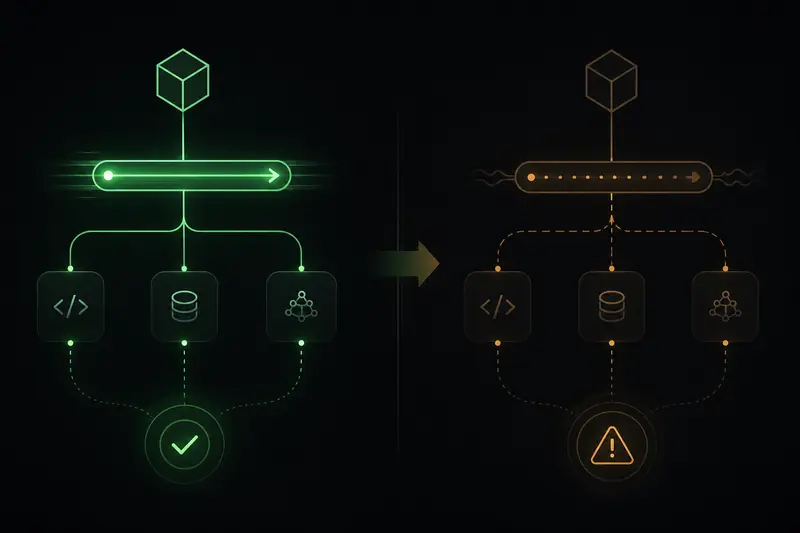
MCP 2026-07-28 stateless SSE deprecation vs Streamable HTTP on the official Unreal Engine 5.8 MCP
plugin - pin one transport per debugging session or you will chase ghosts.
I am not trashing SpecialAgent. Unrestricted Python is real power for Spatial AI Unreal agent workflows - and a real way to delete a map. Label it experimental. Pin SSE if you use it. Do not mix SSE debugging with official Streamable HTTP in the same session until you know which spec each server speaks.
>The Takeaway: MCP gives the agent hands. Viewport capture gives it eyes. The kill-switch keeps the project alive. Transport confusion keeps you in the Output Log until midnight.
Kill-Switch Rules Before the Agent Touches Production
I treat this like a written contract with the agent:
- Never overlap tool calls - one MCP call at a time on the game thread
- Never bind Unreal MCP off localhost - 127.0.0.1 only
- Never allow python execute, bulk delete, or save-all without human confirm
- Always start Cursor after the editor
- If tools look empty, run list_toolsets then describe_toolset - do not declare MCP dead
SpecialAgent's Python execution can wipe assets. Official Unreal MCP has no auth on loopback. Both demand the same discipline.
Reality Check //
Experimental means experimental. APIs will change. Use a sandbox project until you trust the loop.
The downloadable directive in the Toolbox tab has the full checklist copy-paste ready for your agent.
What I Am Building Toward
I am wiring this stack because Spatial AI that cannot touch the editor is a chatbot with a viewport screensaver. Real-time 3D, WebGPU configurators, and agent systems only compound when the loop is live.
This is the Unreal Engine MCP Cursor setup I wish I had before I trusted a green icon over an empty tool registry. Get All Toolsets on, generate the config, prove three prompts, then negotiate what the agent is allowed to break.
EPIC UE 5.8 MCP DOCS →
>Mental model: hands (MCP tools), eyes (viewport capture), kill-switch (human confirm on anything destructive). Skip any leg and Spatial AI becomes expensive theater.
Streamable HTTPLegacy SSEKill-Switch