

What Is LM Studio? When 96GB VRAM Is Not Enough
LM Studio lets you run local language models. I run Llama 4 Scout Instruct with Q4_K_M quantization on two Nvidia A6000 cards - 96GB total VRAM. My workstation still melts like butter in the microwave.
Even splitting both GPUs evenly and tuning inference settings, I hit a wall. The fix? Cap context length at 32,000 tokens. That is what LM Studio is: a GUI for loading GGUF models and serving them via a local OpenAI-compatible API.
And when you want that brain connected to your IDE, you need Kilo Code or something like it. That is the bridge.
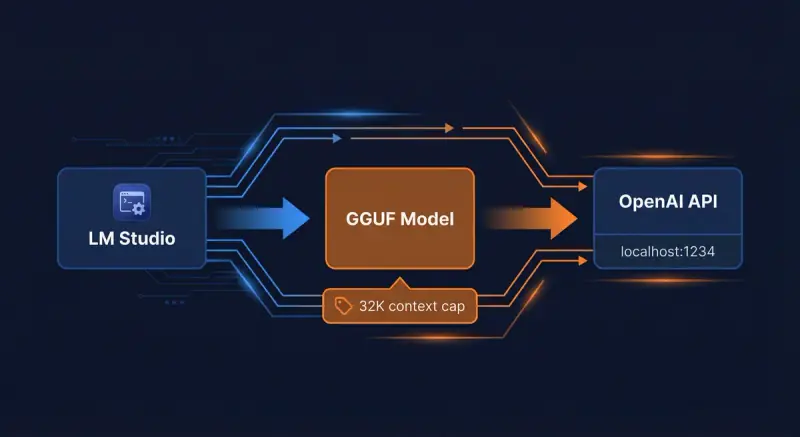
What is LM Studio - a GUI for loading GGUF models, capping context at 32K tokens, and serving
local llm via OpenAI-compatible API.
>Context length is not free. Push past 32K tokens on Llama 4 Scout and your 96GB rig becomes a space heater.
LM StudioKilo CodeLocal LLM
What This Article Covers //
LM Studio vs Ollama, why Kilo Code is essential for IDE integration, context length and VRAM
limits, and how dual A6000s compare to the Mac Mini M4 Pro hype around OpenClaw.
Ollama vs LM Studio: Same Engine, Different Interface
Ollama vs LM Studio - what does it actually mean? For beginners: they are the same tool. Both run local LLMs. Both use llama.cpp under the hood.
The difference is the interface.
LM Studio is GUI-first. You download a model, start the local server, and chat. No terminal required. Polished, visual, great for quick testing.
Ollama is headless - CLI-first. You pull models with
ollama pull, run them in the background. No chat window by default.Same inference engine. Different wrapper.
Here is why that matters for developers. Ollama is faster. It performs better when you use it for local development.
Antigravity IDE, Cursor, Visual Studio Code - Kilo Code talks to both. But Ollama typically runs lighter. Fewer moving parts.
Better for scriptable pipelines, CI, and headless setups.
My preference? Ollama. I develop. I want the model running quietly in the background.
LM Studio is for when I want to poke at a model, test prompts, or show someone a chat interface.
Ollama vs LM Studio - Quick Take //
Same llama.cpp engine. LM Studio = GUI, Ollama = headless. For IDEs and local development, Ollama usually wins.
LM Studio wins for experimentation and chat-first workflows.
Ollama added multi-GPU support later. The lm studio download is a simple installer. Pick your tool based on workflow.
Scriptable and headless? Ollama. Quick testing and polished chat? LM Studio.
Both expose the same OpenAI-compatible API. Kilo Code works with either.
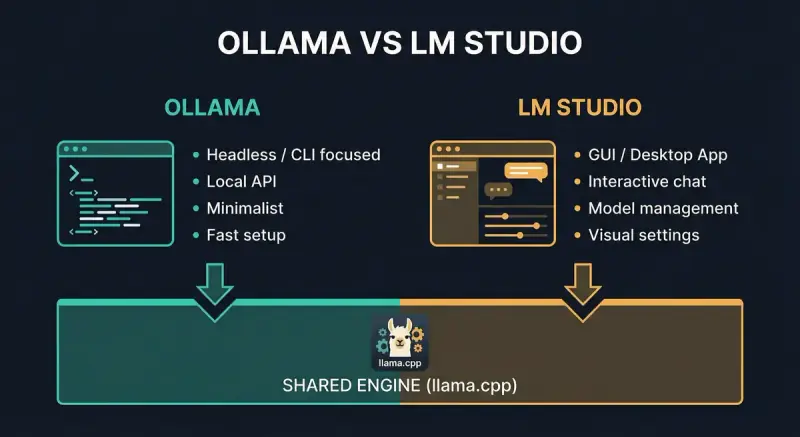
Ollama vs LM Studio - same engine, different interface. Headless for development, GUI for
experimentation and local llm testing.
Context Length Kills //
The KV cache scales with context. A 32K context on Llama 4 Scout eats VRAM fast. I cap at 32,000
tokens. Beyond that, my system throttles and the fans scream.
Kilo Code: The Bridge Between Your IDE and Local LLMs
Cursor IDE and Antigravity IDE talk to cloud APIs - Claude, GPT, Gemini. They do not talk to your local LM Studio server by default. Kilo Code does.
It is a VS Code-compatible extension that connects your editor to local inference. You set LM Studio as the API provider, point it at
http://localhost:1234, and your local Llama becomes the AI brain in your IDE.No Kilo Code, no local model in Cursor or Antigravity. Simple as that.
Open WebUI and AnythingLLM give you chat UIs over local models. Kilo Code gives you coding assistance. Different jobs.
If you develop in Antigravity IDE or Cursor IDE and want to use LM Studio, Kilo Code is the missing link.
Without Kilo Code, your IDE cannot talk to a local llm - you need that bridge to turn lm studio into a coding assistant.
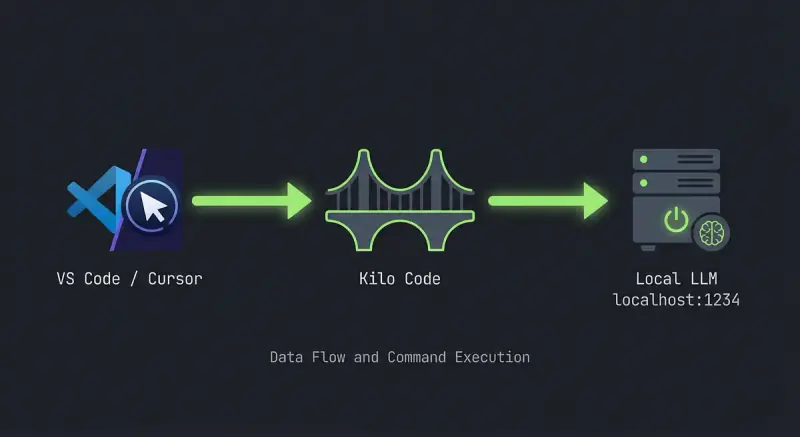
Kilo Code bridges Cursor, Antigravity, and VS Code to your local llm - the missing link for lm
studio and ollama in your IDE.
Context Length and VRAM: The Math That Bites
Llama 4 Scout is a 109B MoE model. Q4_K_M quantized, it needs roughly 60GB for weights. The KV cache grows with context.
At 128K context, you are adding gigabytes. At 32K, I stay safe. At 64K, my PC melts.
I figured 32,000 tokens is my maximum before hitting the wall. Even with 96GB split across two A6000s. Optimize inference all you want - Flash Attention, quantization - you still run out.
Cloud APIs like Gemini in Google AI Studio or Notebook LM do not care. They scale. Local does not.
Mac Mini M4 Pro vs Dual A6000: Speed Reality Check
OpenClaw - formerly ClawdBot, Moltbot - triggered hype around Mac Mini M4 Pro for local AI. Unified RAM. Silent. Cheap.
How does it stack up? Real numbers matter. Here is a comparison based on published benchmarks and my own rig:
| Configuration | Model | Tokens/sec | Context Limit | Power Draw | Notes |
|---|---|---|---|---|---|
| Mac Mini M4 Pro 64GB | DeepSeek R1 32B (4-bit) | 11-14 | ~32K practical | 15-30W | Unified memory, low power |
| Mac Mini M4 Pro 24GB | 14B models | ~10 | ~16K | 15-30W | Entry tier |
| Dual Nvidia A6000 (96GB) | Llama 4 Scout Q4_K_M | 12-18 | 32K max (safe) | 300W+ | Context ceiling hits first |
| Single A6000 48GB | Llama 2 70B (4-bit) | ~15 | ~16K | 300W | Reference benchmark |
| Single A6000 48GB | Llama 2 7B (4-bit) | ~111 | High | 300W | Smaller model, fast |
The Mac Mini trades raw speed for efficiency. My dual A6000 rig is faster on paper for large models, but context length caps me.
The Mac Mini M4 Pro 64GB runs 30-32B models at 10-15 tokens/sec. Similar ballpark.
The difference? The Mac does it at 15 watts. My rig pulls 300+.
For 24/7 local agents, the Mac wins on power. For burst inference on huge context, discrete GPUs still have headroom - if you have the VRAM.
The ai agents you run in Cursor or via OpenClaw are a different breed - they orchestrate tasks, hit APIs, and automate. Your local llm in lm studio with Kilo Code is simpler: inline completions and chat. Both matter.
>Unified RAM is elegant. But when the model weights and KV cache fight for the same pool, speed drops. The A6000 has dedicated VRAM. Different tradeoffs.
Why Local Is Slower Than Cloud (And That Is Fine)
Cloud AI Agents - Claude, GPT-4, Gemini in Google AI Studio - run on datacenter GPUs. Thousands of them. Your local setup is one or two cards.
Inference is slower. Latency is higher. I accept that.
The benefit of LM Studio is privacy, no API bills, and full control. Open WebUI and AnythingLLM layer chat UIs on top. Notebook LM does something different - it is Google's research tool for long-context analysis.
Different use case. For coding assistance via Kilo Code, local models work. They are just slower. Know what you are buying.
AI agents in the cloud are fast and capable. A local llm via lm studio and Kilo Code trades speed for privacy and zero API bills. Pick the tradeoff that fits.
Alternatives in the Ecosystem //
Ollama, LM Studio, Open WebUI, AnythingLLM - all serve local models. OpenClaw adds agent
capabilities on top. Pick the stack that fits your workflow.
The Kilo Code Setup You Need
- Download LM Studio. Get the lm studio download from lmstudio.ai.
- Load a GGUF model (Llama 4 Scout, Mistral, DeepSeek - whatever fits your VRAM).
- Start the Local Server tab. Default:
http://localhost:1234. - Install Kilo Code in VS Code, Cursor, or Antigravity.
- In Kilo Code settings, set API Provider to LM Studio.
- Point base URL at
http://localhost:1234. Set timeout high - local inference can be slow.
That is it. Your IDE now talks to your local model. No cloud. No API key.
Kilo Code is the bridge. LM Studio is the brain. Your code is the beneficiary.
Bottom Line
What is LM Studio? A local inference server with a GUI. LM Studio vs Ollama - both valid. Ollama for automation, LM Studio for experimentation.
Kilo Code connects your IDE to that local brain. Context length will bite you. Cap it.
Mac Mini M4 Pro vs dual A6000 - similar speeds for similar models, different power and form factors. Use what you have. Optimize what you can.
Do not expect cloud speed from local hardware. That is the reality.